

Our Client Almost Fell for This Email Scam: 4 Ways to Spot Phishing Emails
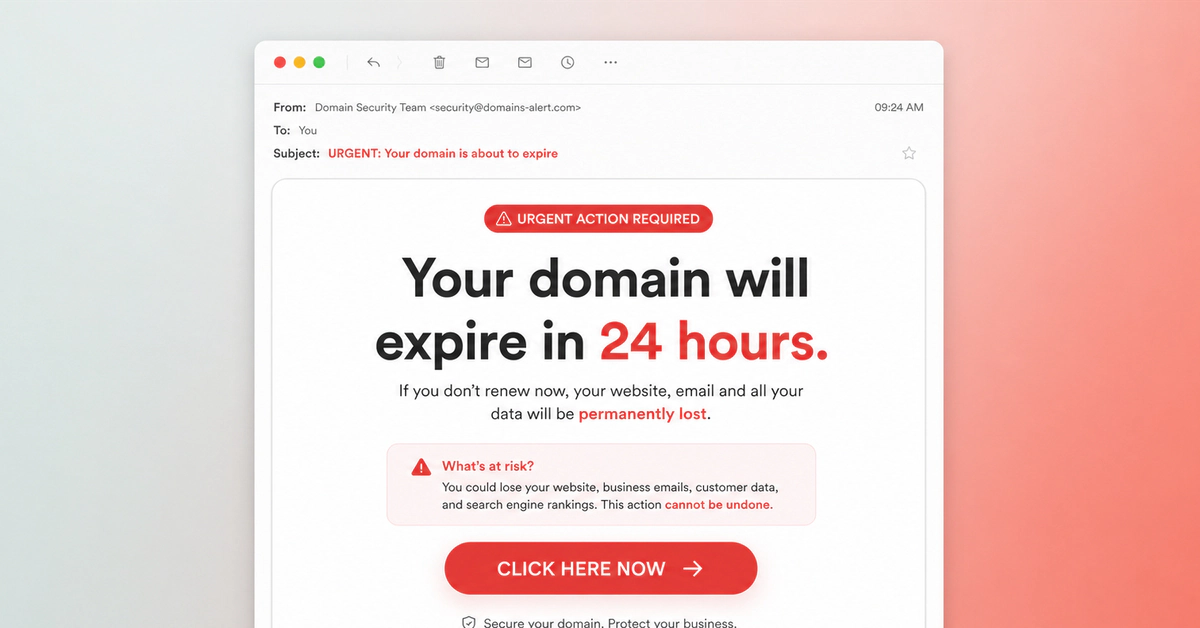
A few days ago, one of our clients forwarded us an email with a rather worrying question:
“Is this real? They’re telling me my domain has expired and that I need to renew it urgently.”
At first glance, the message looked legitimate. It used the name of a well-known company, had a professional design, and created a sense of urgency that could easily make someone act without thinking twice.
After taking a closer look, we confirmed that it was a fraudulent email carefully designed to appear genuine. It wasn’t a mistake, a real notice from the provider, or an administrative notification — it was an attempt at fraud.
What makes this case interesting is not just that it was fake, but how convincing it was.
That’s why I decided to turn this real-life example into a practical guide. If you manage a website, a domain name, or any kind of online presence, knowing how to spot phishing emails could save you anything from a minor scare to a significant financial loss.
Why This Fraudulent Email Looked Completely Real
At first glance, there was nothing obviously suspicious about the message.
It used the name and logo of a well-known company, had a clean design, used professional language and, most importantly, relied on one very powerful trigger: urgency. In this case, the email warned that the domain had expired, that the website could stop working, and that it could be lost permanently if immediate action wasn’t taken.
These messages work precisely because they don’t try to convince you with complex technical explanations. They work because they trigger an emotional response.
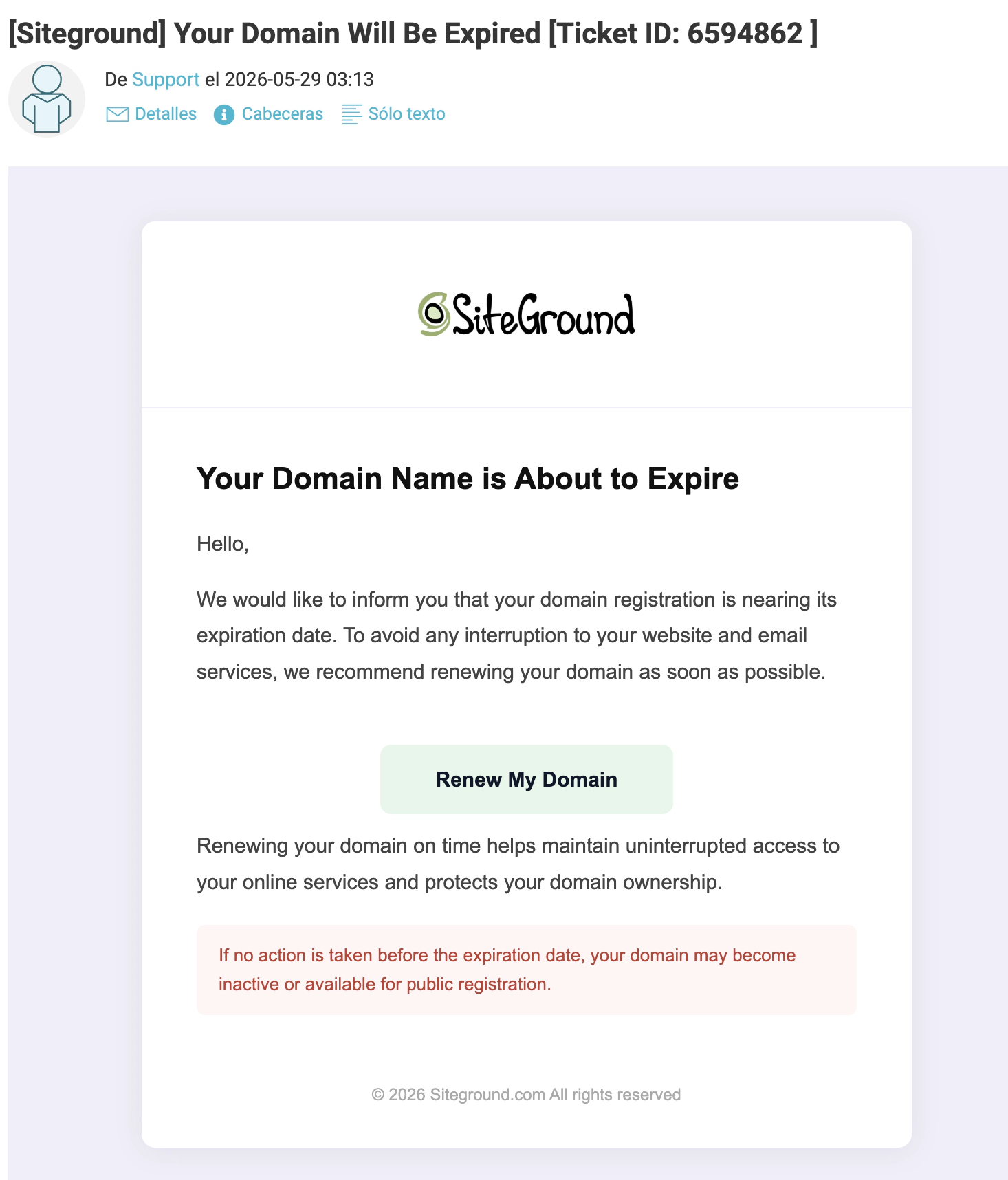
When you read words like “urgent”, “expired”, “final notice” or “permanent loss”, your brain stops analysing the situation calmly and starts reacting quickly. And that’s exactly the environment where a fraudulent email has the highest chance of success.
Before taking any action, we decided to review the message step by step to Spot Phishing Emails.
1. Check Whether the Problem Mentioned in the Email Actually Exists
The first check was the most obvious one: verifying whether the issue described in the email was real.
In our case, the message claimed that the domain had expired and needed to be renewed urgently. However, when we logged directly into the provider’s dashboard, we found that the renewal date was still many months away.
In other words, the problem simply didn’t exist.
Although this particular example involved a domain name, the same logic applies to many other types of messages. It could be a package awaiting delivery, an allegedly unpaid invoice, a locked account, a subscription that’s about to be cancelled, or even a security alert from your bank.
The rule is always the same: never assume an email is telling the truth without verifying the information through an official source.
If the warning is legitimate, you’ll usually be able to see it from your actual account, the official application, or the relevant management dashboard. If you can’t find any evidence of the problem outside the email itself, there’s a good chance you’re dealing with a scam.
2. How to Spot Phishing Emails by Checking the Sender
This is one of the quickest and most effective ways to spot phishing emails.
At first glance, the message may appear to come from a well-known company. But be careful: the name displayed in your inbox doesn’t always match the real email address that sent the message.
To check this:
- Open the email.
- Click on the sender’s name.
- Look for the full email address.
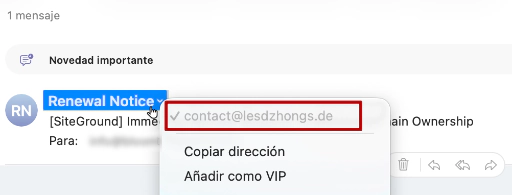
What you need to examine is the part that comes after the @ symbol — in other words, the sender’s domain.
For example, if you receive an email from a company called “Company X”, you would normally expect to see something like:
@companyx.com
or
@mail.companyx.com
However, if you find something like:
@gmail.com
@outlook.com
@strange-domain.net
or any address that has no connection to the company supposedly contacting you, that’s a warning sign.
In our case, the email used the branding and name of a well-known company to build trust. However, when we checked the full address, we discovered it was coming from a completely unrelated domain.
On its own, this check doesn’t always prove that an email is fraudulent. But when the sender doesn’t match who they claim to be, it’s worth stopping and reviewing the other warning signs before clicking any links.
3. How to Spot Phishing Emails by Checking the Link Destination
This was probably the clearest piece of evidence.
The email included a very prominent button encouraging immediate action. In our case it said something along the lines of “Renew Domain Now”, but it could just as easily have been “View Invoice”, “Track Package”, “Verify Account”, “Update Details” or “Avoid Service Suspension”.
Most fraudulent emails are designed to get you to click as quickly as possible. That’s why, before clicking any button, there’s a simple check you can perform in just a few seconds.
- Do not click the link.
- Only hover your mouse over the button or link.
- Look at the address that appears on screen (bottom-left corner).
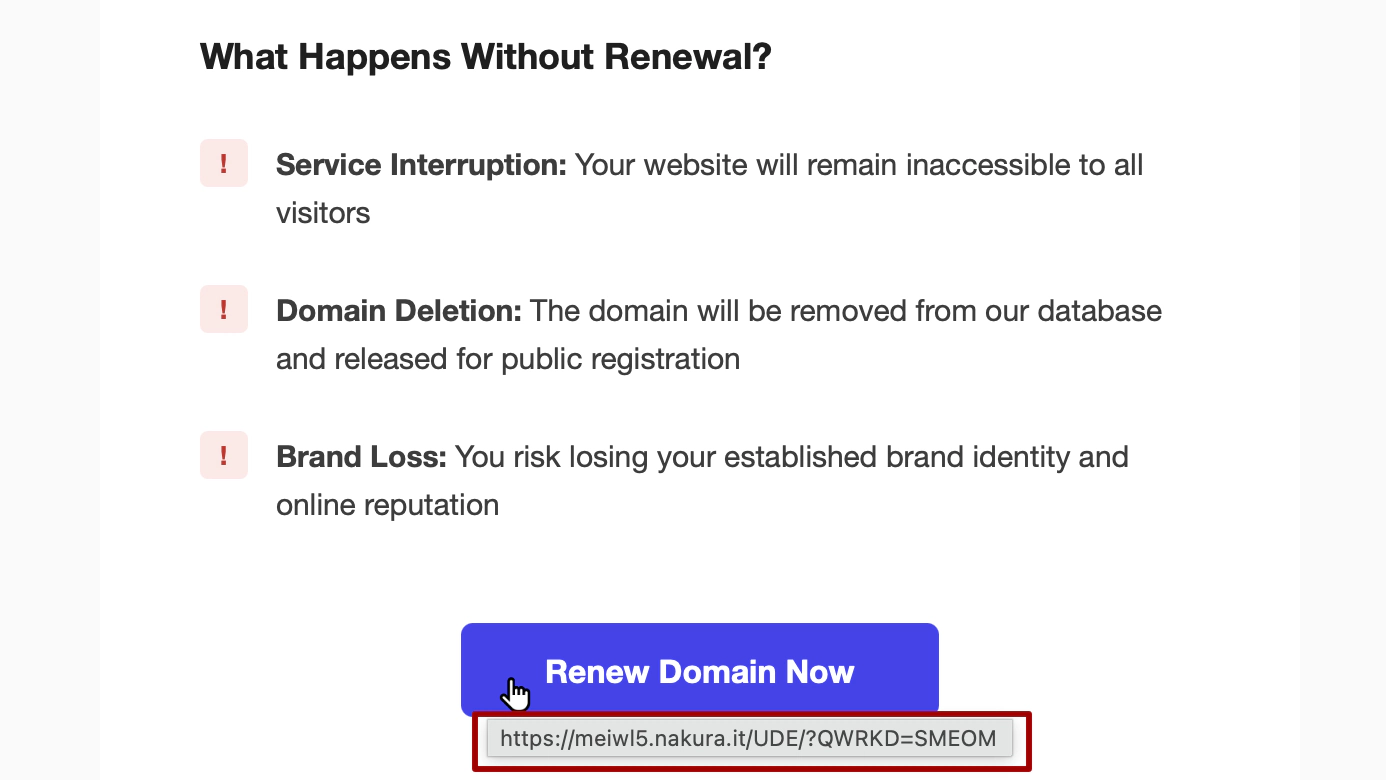
In most browsers, the real URL will appear either next to the link or in the bottom-left corner of the window. This allows you to see where the link leads without actually opening it.
Learning how to check links properly is one of the easiest ways to spot phishing emails in just a few seconds. What you need to verify is whether the domain matches the company that supposedly sent the email. If you see a strange, unfamiliar, or unrelated domain instead, that’s another warning sign.
In our case, the button appeared to lead to the company’s official website. However, when we checked the real URL, it pointed to a completely different domain. That simple check was enough to confirm we were dealing with a fraudulent email.
If you’re reading the email on a mobile device, this check can be more difficult because the destination URL isn’t always visible. That’s why, when you’re unsure about an important message, it’s usually best to review it from a desktop computer before interacting with any links.
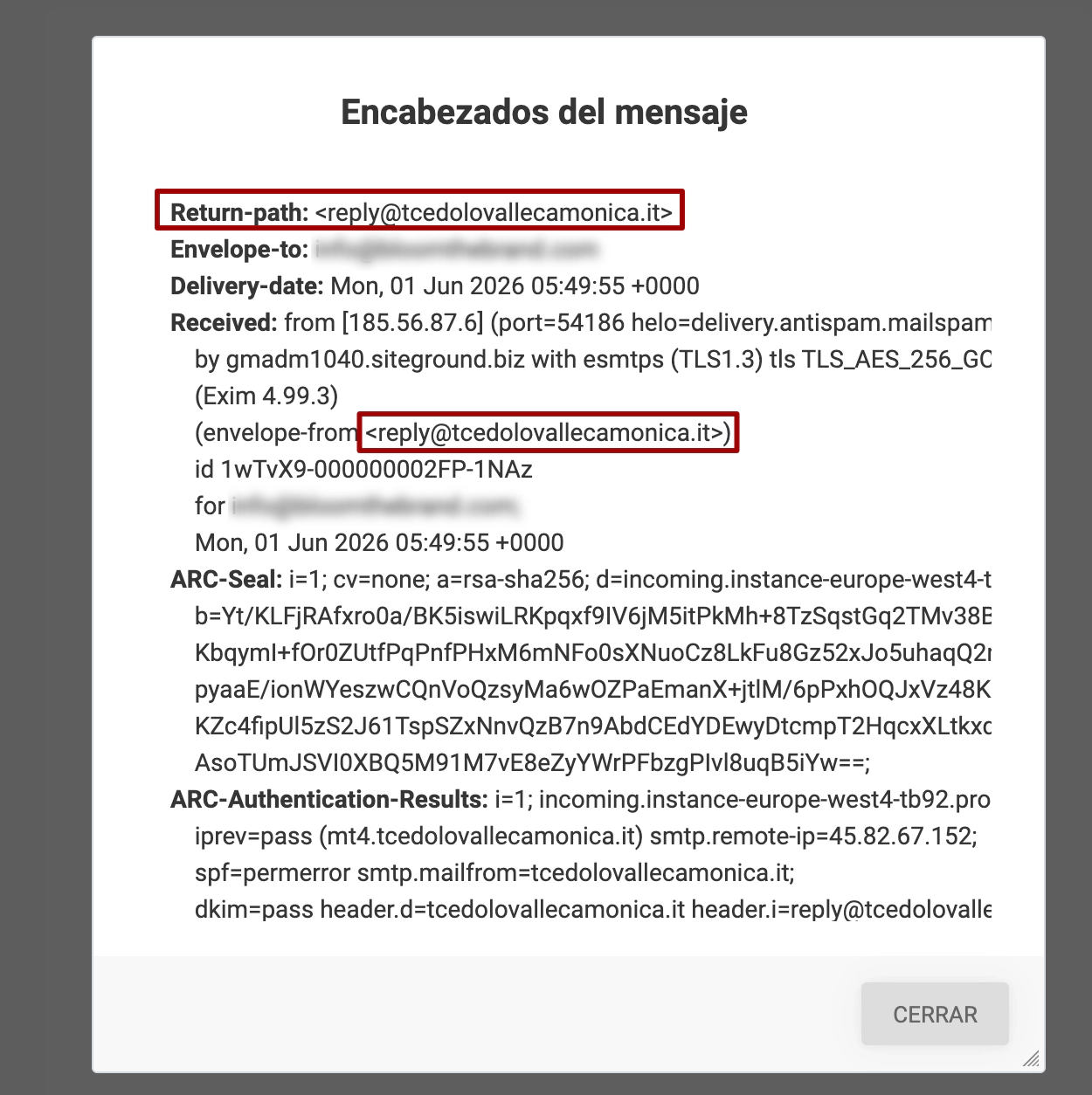
4. Use The Email Headers To Spot Phishing Emails.
This final check is a little more advanced, but it can be extremely useful when you’re still unsure whether an email is genuine. If the previous checks still leave you unsure, email headers can help you spot phishing emails with a much higher level of confidence.
Email headers contain technical information about the route a message took before reaching your inbox. Put simply, they show who actually sent the message, which servers handled it, and which domains were involved in the delivery process.
To access them, open the email and look for an option similar to:
- Show Original
- View Message Source
- View Full Headers
- Show Raw Message
The exact wording varies depending on your email provider, but most platforms offer some version of this feature.
Once opened, you’ll see a large amount of technical information. Don’t worry — you don’t need to understand all of it. Instead, focus on a few specific clues:
- Look for the “From:” or “Return-Path” field.
This shows the actual address used to send the message. Check whether it matches the company supposedly contacting you.
- Look for domain names that appear repeatedly.
If the email claims to come from a specific company, it’s normal to see references to that company’s domain throughout the headers. If multiple unrelated domains appear instead, it’s worth investigating further.
- Check for authentication failures.
You may see references to SPF, DKIM or DMARC. You don’t need to understand exactly what these terms mean, but if you’d like to learn more, Google has a useful explanation of how email authentication works.
In our case, the headers contained several domains that had no connection to the company supposedly sending the message. On their own, they weren’t definitive proof, but combined with the other warning signs, they helped confirm that the email was fraudulent.
What Could Have Happened If Someone Had Fallen for the Scam?
This is arguably the most important part of the story.
Because beyond the technical analysis, what really matters is what could have happened if someone had clicked without checking first.
These attacks are commonly known as phishing. It’s a type of fraud where attackers impersonate a legitimate company, service, or organisation in order to trick victims into handing over money, passwords, banking information, or personal data. What’s concerning is that these messages are becoming increasingly sophisticated and convincing.
In most cases, the goal falls into one of three categories:
- The first is the simplest: collecting payment for a fake renewal. The victim believes they are renewing a legitimate service, but the money goes directly to the attackers.
- The second is credential theft. Many phishing websites imitate legitimate providers and ask users to log in using their email address and password. Once entered, attackers gain access to real accounts.
- The third is financial fraud, where victims are asked to provide credit card details, billing information, or other sensitive financial data that can later be used or sold.
In every case, the outcome is the same: the user believes they are completing a legitimate action, when in reality they are handing information over to a third party.
What Should You Do If You’ve Identified a Fraudulent Email?
Once you’ve confirmed that an email is fraudulent, simply ignoring it isn’t always enough. There are a few simple steps you can take to protect both yourself and others.
- Mark the email as spam or phishing within your email client. This helps future messages get filtered automatically and contributes to improving detection systems.
- If the message is impersonating a specific company, consider reporting it. Many organisations provide dedicated email addresses or reporting forms for phishing attempts. A quick search of their help centre or security section will usually tell you where to send these reports.
- Keep a copy if you’ve interacted with the message. If you’ve clicked links, downloaded files, or entered information, it’s worth saving the email and taking screenshots before deleting it. This information may be useful if you need to contact your bank, submit a complaint, or explain the situation to technical support.
- If you haven’t interacted with it, you can safely delete the email once you’ve finished reviewing and reporting it.
What If You’ve Already Clicked or Fallen for the Scam?
Not all is lost, but it’s important to act quickly.
If you’ve entered a password, change it immediately and enable two-factor authentication if the service supports it.
If you’ve shared banking details or made a payment, contact your bank as soon as possible to explain the situation. They can advise you on options such as blocking transactions, cancelling cards, or filing a claim.
And if you’ve reused that same password elsewhere, change it there too. Password reuse is one of the most common security mistakes and can significantly increase the impact of a breach.
The most important thing is to act fast. The sooner you identify the issue, the more options you’ll have to minimise the damage.
Conclusion
Fraudulent emails have evolved considerably. They’re no longer the poorly written, obvious scams they once were. Today, a fraudulent email can have a polished design, professional copy, and appear completely legitimate at first glance.
The good news is that once you know how to spot phishing emails, many of the warning signs become surprisingly easy to recognise.
In this case, it only took a few minutes of investigation to confirm that the warning was fake and that the domain was never at risk.
At Bloom The Brand, we work every day with digital brands, website design, and online strategy. And if there’s one thing we’ve learned, it’s this: security isn’t an optional extra — it’s part of the overall brand experience.
Because helping people spot phishing emails is just as important as building websites that look great.

